From the dumbest case-conversion to SIMD — a benchmark journey
We start character-case conversion with the dumbest algorithm with 26 if-else branches and gradually improve the performance until we reach a SIMD case-conversion algorithm.
Case conversion is a complex topic that looks simple. We’re going to explore its edges, write multiple versions, speak about their benefits and pitfalls, and finally benchmark them.
The dumbest version#
Let’s define the problem first. Suppose we have a string of ASCII characters. It may contain printable characters, control characters, etc. Sometimes we need to convert the case of characters, but non-alphabet characters should stay as is. For example, the host part of website URLs is case-insensitive; therefore, browsers almost always convert the host part to lowercase before continuing processing. Our goal is to convert the case of each character. For example, ‘A’ should become ‘a’, ‘B’ becomes ‘b’ and so on.
This leads us to the simplest implementation, which uses a long chain of if-else branches.
inline void ToLower_Dumbest(string& s)
{
    for (char& c : s)
    {
        if (c == 'A') c = 'a';
        else if (c == 'B') c = 'b';
        else if (c == 'C') c = 'c';
        else if (c == 'D') c = 'd';
        else if (c == 'E') c = 'e';
        else if (c == 'F') c = 'f';
        else if (c == 'G') c = 'g';
        else if (c == 'H') c = 'h';
        else if (c == 'I') c = 'i';
        else if (c == 'J') c = 'j';
        else if (c == 'K') c = 'k';
        else if (c == 'L') c = 'l';
        else if (c == 'M') c = 'm';
        else if (c == 'N') c = 'n';
        else if (c == 'O') c = 'o';
        else if (c == 'P') c = 'p';
        else if (c == 'Q') c = 'q';
        else if (c == 'R') c = 'r';
        else if (c == 'S') c = 's';
        else if (c == 'T') c = 't';
        else if (c == 'U') c = 'u';
        else if (c == 'V') c = 'v';
        else if (c == 'W') c = 'w';
        else if (c == 'X') c = 'x';
        else if (c == 'Y') c = 'y';
        else if (c == 'Z') c = 'z';
    }
}In this version, the code loops over all characters and checks each against 26 uppercase characters. If it matches, the code replaces it with its lowercase counterpart.
The dumb version#
Since we previously established that a switch statement is typically faster than a long chain of if-else branches for integral or enumerable variables, the natural question is: why not just use a switch statement?
Let’s implement the previous function with a switch.
inline void ToLower_Dumb(string& s)
{
    for (char& c : s)
    {
        switch (c)
        {
        case 'A': c = 'a';
            break;
        case 'B': c = 'b';
            break;
        case 'C': c = 'c';
            break;
        case 'D': c = 'd';
            break;
        case 'E': c = 'e';
            break;
        case 'F': c = 'f';
            break;
        case 'G': c = 'g';
            break;
        case 'H': c = 'h';
            break;
        case 'I': c = 'i';
            break;
        case 'J': c = 'j';
            break;
        case 'K': c = 'k';
            break;
        case 'L': c = 'l';
            break;
        case 'M': c = 'm';
            break;
        case 'N': c = 'n';
            break;
        case 'O': c = 'o';
            break;
        case 'P': c = 'p';
            break;
        case 'Q': c = 'q';
            break;
        case 'R': c = 'r';
            break;
        case 'S': c = 's';
            break;
        case 'T': c = 't';
            break;
        case 'U': c = 'u';
            break;
        case 'V': c = 'v';
            break;
        case 'W': c = 'w';
            break;
        case 'X': c = 'x';
            break;
        case 'Y': c = 'y';
            break;
        case 'Z': c = 'z';
            break;
        }
    }
}This implementation is easy to understand; it replaces every character that matches an uppercase letter with its lowercase counterpart.
The normal version#
Since characters are enumerable and alphabet characters are in a sequence (see here), we can easily use logical operators to determine if a character is in the uppercase character range. Furthermore, we can use arithmetic operators to offset the character to its lowercase equivalent.
inline void ToLower_Normal(string& s)
{
    for (char& c : s)
    {
        if (c >= 'A' && c <= 'Z')
            c = static_cast<char>(c - 'A' + 'a');
    }
}In this version, it checks if the character is in the range of A-Z, and then offsets the character using the difference between ‘a’ and ‘A’.
Note: (‘a’ - ‘A’) is 32(0x20).
The benchmark journey begins#
Let’s set up a small benchmark harness for the implementations.
To benchmark the code, I used the google/benchmark library. It’s very easy to use. It has three main parts: including the header, writing the benchmark function and using the benchmark main macro.
Google benchmark quick look#
- Header: The main google benchmark header is
benchmark/benchmark.h. It contains all the macros that we need. - BENCHMARK macro: It is used to register a function as a benchmark function.
- BENCHMARK_MAIN macro: This macro implements the main function, automatically runs the benchmarks, and prints the outputs to stdout.
Benchmark function#
A benchmark function is a static function with a void return type. It takes a state argument that controls the benchmark loop. To differentiate between normal functions and benchmark functions, we use a BM_ prefix for the function names.
static void BM_ToLower_Dumbest(benchmark::State& state)
{
    for (auto _ : state)
    {
        std::string s = input;
        ToLower_Dumbest(s);
        benchmark::DoNotOptimize(s);
    }
    state.SetBytesProcessed(state.iterations() * static_cast<int64_t>(input.size()));
}BM_ToLower_Dumbest is a benchmark function.
To register the benchmark function, we use the BENCHMARK macro like in the code snippet below:
BENCHMARK(BM_ToLower_Dumbest);The benchmark result#
The code for the benchmark is available in the repository, so I didn’t include it here. However, before showing the results, I need to define the input value that you can see in snippet 4.
We need a string long enough to measure the actual time of the algorithm rather than the surrounding benchmark noise. I chose 4096 characters which is 4 KiB.
Now we need to generate the string. The easiest way is to use the string(size_t count, char ch) constructor, so let’s go with that.
const string input(4096, 'A');The rest is easy, just run the benchmark and get the results.
| Benchmark | Time | CPU | Iterations | Throughput |
|---|---|---|---|---|
| BM_ToLower_Dumbest | 1474 ns | 1413 ns | 497,778 | 2.70 GiB/s |
| BM_ToLower_Dumb | 3543 ns | 3530 ns | 203,636 | 1.08 GiB/s |
| BM_ToLower_Normal | 1163 ns | 1074 ns | 640,000 | 3.55 GiB/s |
Wait, what just happened? How is it possible that the switch statement is slower than the if-else branches?
The answer lies in the input. Because we chose A and fill the entire string with it, and our if-else chain starts by checking for A, every character is resolved in the very first if branch. A single, highly predictable if branch is extremely fast.
So, what if we choose Z instead of A?
| Benchmark | Time | CPU | Iterations | Throughput |
|---|---|---|---|---|
| BM_ToLower_Dumbest | 46784 ns | 46039 ns | 14,933 | 0.08 GiB/s |
| BM_ToLower_Dumb | 3087 ns | 2888 ns | 248,889 | 1.32 GiB/s |
| BM_ToLower_Normal | 1258 ns | 1221 ns | 448,000 | 3.13 GiB/s |
What a beautiful result. It shows us the difference between switch and if-else branches. The if-else chain’s speed drops dramatically, but switch statement’s speed stays stable across tests.
But this is also not a fair test. Let’s choose a random string, as shown in Snippet 5.
const string input(
"mEHogujvUDQWkHfobSdEfZkmWb...(4070 more)"); //the literal is abbreviated.Random input result.#
| Benchmark | Time | CPU | Iterations | Throughput |
|---|---|---|---|---|
| BM_ToLower_Dumbest | 39463 ns | 38504 ns | 18,667 | 0.10 GiB/s |
| BM_ToLower_Dumb | 18952 ns | 18485 ns | 44,800 | 0.21 GiB/s |
| BM_ToLower_Normal | 2949 ns | 2783 ns | 235,789 | 1.37 GiB/s |
Although the switch approach is 2x faster than the if-else chain, the throughput of both drops significantly because the CPU’s branch predictor cannot predict the random string.
The random input hurts every branch dependent version, including ToLower_Normal. That raises the next question: can we solve this without conditional jumps?
Getting clever#
Let’s take a look at the binary representation of alphabet characters.
| Upper case character | Binary | Lower case character | Binary |
|---|---|---|---|
| A | 01000001 | a | 01100001 |
| B | 01000010 | b | 01100010 |
| C | 01000011 | c | 01100011 |
| … | … | … | … |
| Y | 01011001 | y | 01111001 |
| Z | 01011010 | z | 01111010 |
As you can see in Figure 4, the binary representation of uppercase and lowercase for each character is identical except the 5th bit, which is zero for uppercase and one for lowercase characters. So we can just toggle the 5th bit to convert an uppercase letter to lowercase and vice versa.
Why branchless can help#
Branches, especially mispredicted branches, are very costly for CPUs. On the other hand, bitwise operations are very cheap for CPUs; some CPUs can even execute multiple bitwise operations in a single CPU clock cycle!
The implementations#
inline void ToLower_Clever(string& s)
{
    constexpr auto mask = 0x20;
    for (auto &c: s)
    {
        c |= mask;
    }
}There are no branches anymore; these types of algorithms are called Branchless or Branch-free since they don’t rely on conditional jumps!
| Benchmark | Time | CPU | Iterations | Throughput |
|---|---|---|---|---|
| BM_ToLower_Dumbest | 36454 ns | 35296 ns | 19,478 | 0.11 GiB/s |
| BM_ToLower_Dumb | 17058 ns | 17090 ns | 44,800 | 0.22 GiB/s |
| BM_ToLower_Normal | 2723 ns | 2727 ns | 263,529 | 1.40 GiB/s |
| BM_ToLower_Clever | 86.1 ns | 87.2 ns | 8,960,000 | 43.75 GiB/s |
That result looks unbelievable, and it is. The implementation has a bug: because the bitwise OR is not limited to alphabetic characters, it also modifies punctuation. For example, it converts [ to {. So, this version only works when you are absolutely sure your string contains only alphabet characters.
I’ve renamed the ToLower_Clever to ToLower_Clever_Partial and started digging for a branchless way to limit the formula to uppercase characters only. Finally, I found it. I’m going to write a complex looking code below, then I’ll explain it.
inline void ToLower_Clever_Partial(string& s)
{
    constexpr auto mask = 0x20;
    for (auto &c: s)
    {
        c |= mask;
    }
}

inline void ToLower_Clever(string& s)
{
    constexpr auto GREATER_EQUAL_A = 0x80 - 'A';
    constexpr auto GREATER_THAN_Z = 0x80 - ('Z' + 1);
    constexpr auto HIGHEST_BIT_MASK = 0x80;
    for (auto &c: s)
    {
        const auto lowSevenBits = c & ~HIGHEST_BIT_MASK;
        const auto highestBit = c & HIGHEST_BIT_MASK;
        const auto ge_A = lowSevenBits + GREATER_EQUAL_A;
        const auto gt_Z = lowSevenBits + GREATER_THAN_Z;
        const auto isUpper = ge_A & ~gt_Z & HIGHEST_BIT_MASK & ~highestBit;
        c |= static_cast<char>(isUpper >> 2);
    }
}Play with the visualizer first; the explanation below walks through the same variables.
branchless ascii trace
Bitwise ToLower visualizer
Step through one byte at a time and watch the range mask become the lowercase bit.
const auto lowSevenBits = c & ~HIGHEST_BIT_MASK;const auto highestBit = c & HIGHEST_BIT_MASK;const auto ge_A = lowSevenBits + GREATER_EQUAL_A;const auto gt_Z = lowSevenBits + GREATER_THAN_Z;const auto isUpper = ge_A & ~gt_Z & HIGHEST_BIT_MASK & ~highestBit;c |= static_cast<char>(isUpper >> 2);input
H
output
h
Lines 1 to 8 show the previously renamed function. Let’s explain the algorithm.
There is a very beautiful trick that I’ll explain first.
Carry into bit 7: The first thing we need is to differentiate A..Z characters mathematically. Since all standard ASCII printable characters are less than 0x80 (128), we can use bit 7 (the highest bit) as a mathematical flag. We can offset the character to flip bit 7 if the current character is between A and Z. So we can categorize characters into four groups:
- Characters greater than or equal to
0x80: These characters’ bit 7 is already one. We can safely filter them out. - Characters less than
A: If we offset these characters by(0x80 - 'A'), bit 7 remains zero. - Characters greater than
Z: If we offset these characters by(0x80 - ('Z' + 1)), bit 7 flips to one. - Characters between
AandZ: If we offset them by(0x80 - 'A'), bit 7 flips to one and if we offset them by(0x80 - ('Z' + 1)), bit 7 remains zero.
That’s it! The characters that meet the conditions of the fourth group are our target. See the ToLower_Clever again.
- Line 17: This line clears bit 7 to prevent overflow during addition. We handle characters that originally had bit 7 set in the final step.
- Line 18: This line remembers whether the original character had bit 7 set.
- Line 19: Offsets the character by
(0x80 - 'A'). - Line 20: Offsets the character by
(0x80 - ('Z' + 1)). - Line 21: Calculates if the character is in group four and isolates bit 7. It keeps characters that are greater than or equal to
Aand are not greater thanZand originally had bit 7 as zero. It then ANDs the result with 0x80 to clear the lower 7 bits. SoisUppercan have two possible values: for characters betweenAandZit is0x80, otherwise it is zero. - Line 22: We need to flip the 5th bit of an uppercase character. By shifting
isUpperby two,0x80becomes0x20and voila!
The uppercase characters are converted to their lowercase counterparts like a piece of cake.
A quick look at the benchmark#
| Benchmark | Time | CPU | Iterations | Throughput |
|---|---|---|---|---|
| BM_ToLower_Dumbest | 36454 ns | 35296 ns | 19,478 | 0.11 GiB/s |
| BM_ToLower_Dumb | 17058 ns | 17090 ns | 44,800 | 0.22 GiB/s |
| BM_ToLower_Normal | 2723 ns | 2727 ns | 263,529 | 1.40 GiB/s |
| BM_ToLower_Clever_Partial | 86.1 ns | 87.2 ns | 8,960,000 | 43.75 GiB/s |
| BM_ToLower_Clever | 1566 ns | 1538 ns | 497,778 | 2.48 GiB/s |
As you can see, the clever way is 2x faster than the normal algorithm. Also, the result of ToLower_Clever_Partial is insane; the compiler is doing some vectorization. You can see the compiled assembly code here.
The professional version — SWAR#
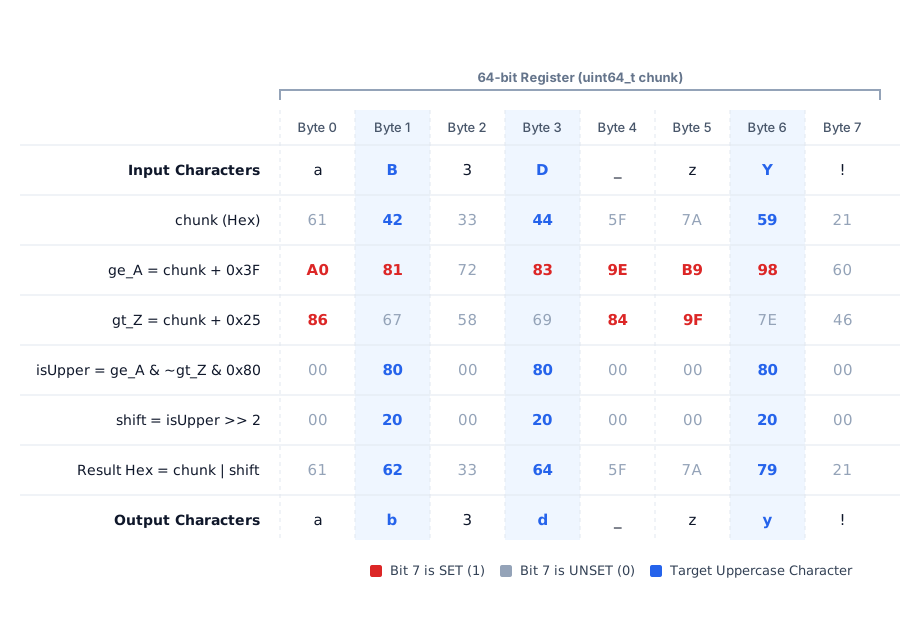
The algorithm of converting an uppercase character to lowercase is the same as ToLower_Clever. (Note: This assumes the string’s length is a multiple of eight characters (8 bytes)).
inline void ToLower_SWAR(string& s)
{
    constexpr uint64_t GREATER_EQUAL_A = 0x0101010101010101ULL * (0x80 - 'A');
    constexpr uint64_t GREATER_THAN_Z = 0x0101010101010101ULL * (0x80 - ('Z' + 1));
    constexpr uint64_t HIGHEST_BIT_MASK = 0x8080808080808080ULL;

    uint64_t index = 0;
    char* data = s.data();
    while (index < s.size())
    {
        uint64_t chunk;
        memcpy(&chunk, data + index, 8);

        const uint64_t lowSevenBits = chunk & ~HIGHEST_BIT_MASK;
        const uint64_t highestBit = chunk & HIGHEST_BIT_MASK;

        const uint64_t ge_A = lowSevenBits + GREATER_EQUAL_A;
        const uint64_t gt_Z = lowSevenBits + GREATER_THAN_Z;
        const uint64_t isUpper = ge_A & ~gt_Z & HIGHEST_BIT_MASK & ~highestBit;

        chunk |= (isUpper >> 2);
        memcpy(data + index, &chunk, 8);
        index += 8;
    }
}
Another quick look at the benchmark results#
| Benchmark | Time | CPU | Iterations | Throughput |
|---|---|---|---|---|
| BM_ToLower_Dumbest | 36454 ns | 35296 ns | 19,478 | 0.11 GiB/s |
| BM_ToLower_Dumb | 17058 ns | 17090 ns | 44,800 | 0.22 GiB/s |
| BM_ToLower_Normal | 2723 ns | 2727 ns | 263,529 | 1.40 GiB/s |
| BM_ToLower_Clever_partial | 86.1 ns | 87.2 ns | 8,960,000 | 43.75 GiB/s |
| BM_ToLower_Clever | 1566 ns | 1538 ns | 497,778 | 2.48 GiB/s |
| BM_ToLower_SWAR | 402 ns | 399 ns | 1,723,077 | 9.56 GiB/s |
By using bitwise operations to process multiple characters at once, SWAR is almost 4x faster than the corrected clever version. Modern CPUs usually have registers wider than 64 bits, from 128-bit SSE to 512-bit AVX-512, so we can apply the same idea to more bytes at once.
The GOAT#
If the string’s length is a multiple of 16 bytes, we can utilize SSE SIMD instructions. SSE uses 16-byte wide registers.
For more information on SSE functions and also wider versions like AVX, AVX2, etc, see this.
inline void ToLower_SSE2(string& s)
{
    const auto SSE_GREATER_EQUAL_A = _mm_set1_epi8(0x80 - 'A');
    const auto SSE_GREATER_THAN_Z = _mm_set1_epi8(0x80 - ('Z' + 1));
    const auto SSE_HIGHEST_BIT_MASK = _mm_set1_epi8(static_cast<char>(0x80));

    uint64_t index = 0;
    char* data = s.data();
    while (index < s.size())
    {
        auto chunk = _mm_loadu_si128(reinterpret_cast<__m128i*>(data + index));
        const auto lowSevenBits = _mm_andnot_si128(SSE_HIGHEST_BIT_MASK, chunk);
        const auto highestBit = _mm_and_si128(chunk, SSE_HIGHEST_BIT_MASK);

        const auto ge_A = _mm_add_epi8(lowSevenBits, SSE_GREATER_EQUAL_A);
        const auto gt_Z = _mm_add_epi8(lowSevenBits, SSE_GREATER_THAN_Z);
        const auto isUpper = _mm_and_si128(_mm_andnot_si128(gt_Z, ge_A),
                                           _mm_andnot_si128(highestBit, SSE_HIGHEST_BIT_MASK));
        chunk = _mm_or_si128(chunk, _mm_srli_epi16(isUpper, 2));
        _mm_storeu_si128(reinterpret_cast<__m128i*>(data + index), chunk);
        index += 16;
    }
}Okay, let me go through it step by step.
- Line 11: Loads 16 characters to the
chunkvariable. The u in_mm_loadu_si128means the memory is unaligned. - Line 12: NOTs
SSE_HIGHEST_BIT_MASKand ANDs it withchunk. - Line 13: ANDs
chunkwithSSE_HIGHEST_BIT_MASK. - Line 15: Adds packed 8-bit integers in
lowSevenBitsandSSE_GREATER_EQUAL_A.
Register A: [ 0x41 | 0x42 | 0x20 | ... 13 more bytes ]
Register B: [ 0x3F | 0x3F | 0x3F | ... 13 more bytes ]
            ------------------------------------------
Result: [ 0x80 | 0x81 | 0x5F | ... 13 more bytes ]- Line 16: Adds packed 8-bit integers in
lowSevenBitsandSSE_GREATER_THAN_Z. - Line 17: Calculates
ge_A & ~gt_Z & SSE_HIGHEST_BIT_MASK & ~highestBit. - Line 18: Stores the result to
chunk.
Yet another look at the benchmark results#
| Benchmark | Time | CPU | Iterations | Throughput |
|---|---|---|---|---|
| BM_ToLower_Dumbest | 36454 ns | 35296 ns | 19,478 | 0.11 GiB/s |
| BM_ToLower_Dumb | 17058 ns | 17090 ns | 44,800 | 0.22 GiB/s |
| BM_ToLower_Normal | 2723 ns | 2727 ns | 263,529 | 1.40 GiB/s |
| BM_ToLower_Clever_partial | 86.1 ns | 87.2 ns | 8,960,000 | 43.75 GiB/s |
| BM_ToLower_Clever | 1566 ns | 1538 ns | 497,778 | 2.48 GiB/s |
| BM_ToLower_SWAR | 402 ns | 399 ns | 1,723,077 | 9.56 GiB/s |
| BM_ToLower_SSE2 | 226 ns | 225 ns | 2,986,667 | 16.96 GiB/s |
So, we implemented ToLower with SWAR and SIMD, and saw the significant improvement in performance.
Library and compiler-specific baselines#
I also implemented two other functions using the C++ standard library and MSVC compiler-specific __ascii_tolower function, and included the BM_ToUpper_SSE2 and BM_ToUpper_SWAR in the code and in the benchmarks table.
inline void ToLower_std(string& s)
{
    for (char& c : s)
    {
        c = static_cast<char>(std::tolower(static_cast<unsigned char>(c)));
    }
}

inline void ToLower_ASCII_Compiler_Specific(string& s)
{
    for (char& c : s)
    {
        c = static_cast<char>(__ascii_tolower(static_cast<unsigned char>(c)));
    }

}| Benchmark | Time | CPU | Iterations | Throughput |
|---|---|---|---|---|
| BM_ToLower_Dumbest | 36454 ns | 35296 ns | 19,478 | 0.11 GiB/s |
| BM_ToLower_Dumb | 17058 ns | 17090 ns | 44,800 | 0.22 GiB/s |
| BM_ToLower_Normal | 2723 ns | 2727 ns | 263,529 | 1.40 GiB/s |
| BM_ToLower_Clever_partial | 86.1 ns | 87.2 ns | 8,960,000 | 43.75 GiB/s |
| BM_ToLower_Clever | 1566 ns | 1538 ns | 497,778 | 2.48 GiB/s |
| BM_ToLower_SWAR_UB | 406 ns | 408 ns | 1,723,077 | 9.35 GiB/s |
| BM_ToLower_SWAR | 402 ns | 399 ns | 1,723,077 | 9.56 GiB/s |
| BM_ToLower_SSE2 | 226 ns | 225 ns | 2,986,667 | 16.96 GiB/s |
| BM_ToUpper_SWAR | 404 ns | 401 ns | 1,792,000 | 9.51 GiB/s |
| BM_ToUpper_SSE2 | 226 ns | 225 ns | 2,986,667 | 16.96 GiB/s |
| BM_ToLower_std | 13819 ns | 13811 ns | 49,778 | 0.28 GiB/s |
| BM_ToLower_ASCII_Compiler_Specific | 1876 ns | 1880 ns | 407,273 | 2.03 GiB/s |
So, we implemented ToLower with SWAR and SIMD, and saw the significant improvement in performance even in comparison with std library and compiler-specifics. So, let’s conclude the journey.
Conclusion#
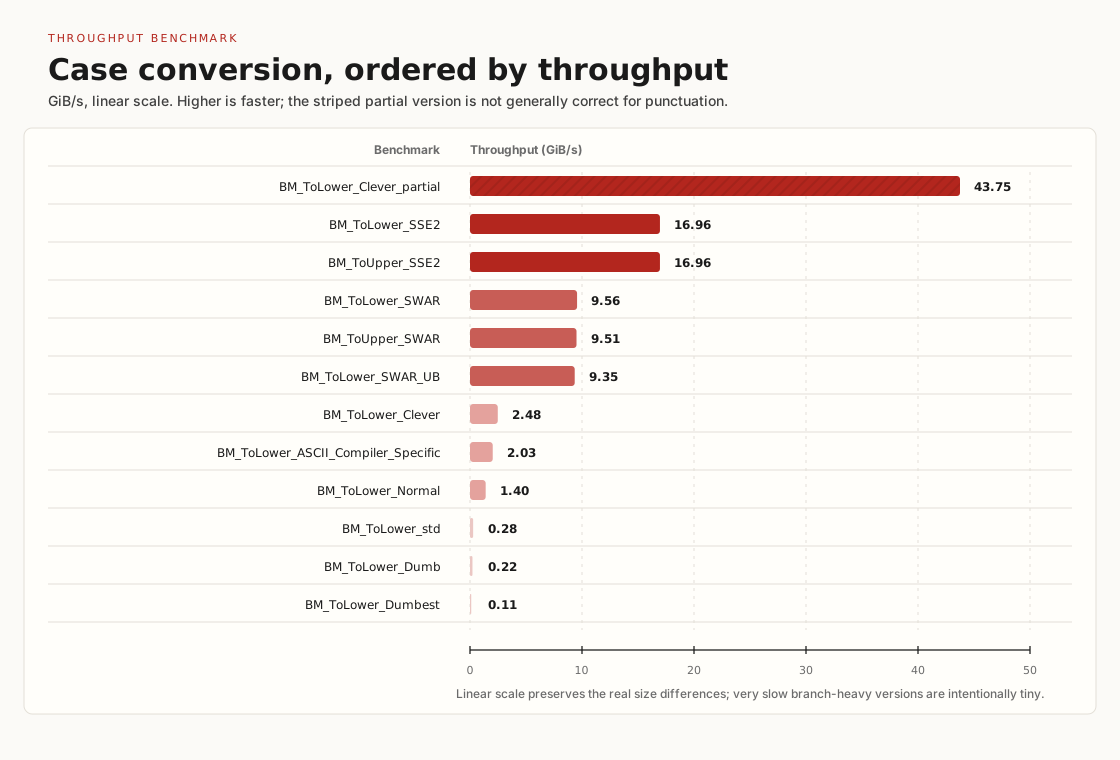
The main lesson is not that everyone should hand-write SSE2 for case conversion. Most code should use the boring, correct library path. But when the input domain is narrow, the constraints are explicit, and the hot path matters, a small amount of byte-level reasoning can beat both branch-heavy code and some compiler-specific helpers.
Bonus: generators#
Writing many if-else branches and switch-cases is very painful, so I wrote a Python script to generate them for me. I also included a random string generator in it.
from math import floor
from random import random

code = ""
for i in range(26):
    code += f"if (c == '{chr(ord('A') + i)}') c = '{chr(ord('a') + i)}'; \n"
    if i != 25:
        code += "else "
print(code)

code = "switch(c) {\n"
for i in range(26):
    code += f"\tcase '{chr(ord('A') + i)}':  c = '{chr(ord('a') + i)}'; break;\n"
code += '}'
print(code)

code = "const string input = \""
for i in range(4096):
    n = floor(random() * 52)
    if n < 26:
        code += chr(ord('A') + n)
    else:
        code += chr(ord('a') + n - 26)
code += "\";"
print(code)Appendixes#
The code repository#
You can clone the repository from “https://github.com/switchcaselab/code”, which contains all the source code and build scripts you will need.
The repository currently only contains the “from-the-dumbest-case-conversion-to-simd-a-benchmark-journey” project, but I plan to add more projects gradually. I try to share dependencies across projects so it will be easier for you to run them.
C++ projects use CMake as a build system and VCPkg for downloading and compiling dependencies.
Project setup#
First, you should set up CMake. You can download the latest version from their website here or install it through your OS package manager.
Second, you should initialize Vcpkg. If you are using Windows, there is a bootstrap-vcpkg.bat script in the repository; if you are using Linux, there is a bootstrap-vcpkg.sh script. Running the appropriate script will initialize Vcpkg.
Third, you can now generate build scripts using CMake presets. Go to the project directory and run the following commands:
cmake --preset release
cmake --build --preset release
Fourth, there is a case-conversion executable in the cmake-build-release directory. You can run it to see the benchmark results.
▸ stay subscribed
Liked this?
Drop your email and you'll get the next post when it's published. No tracking, one-click unsubscribe.